




Fast Video Maker for Windows
- Trial version
- 4.21
- 7
- V2.0.0
Download for Windows
View an ad to download for free
Easy Video Editing Software for Windows
Fast Video Maker is a Windows video editing application that makes it easy to create professional-looking videos from photos, video clips, music, and text. Whether you're producing content for YouTube, Instagram, Facebook, business presentations, school projects, or personal memories, the software provides a simple editing workflow without requiring advanced video editing skills.
The application is designed for users who want to create high-quality videos without spending hours learning complex editing software. Its clean interface keeps the editing process straightforward while providing the tools needed to produce polished videos.
Create Videos in Minutes
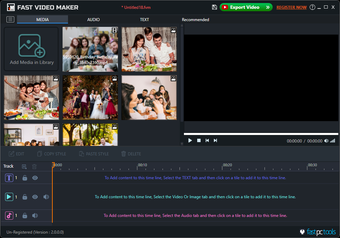
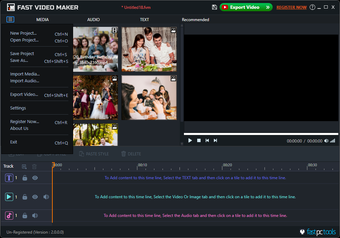
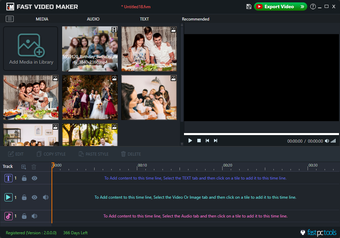
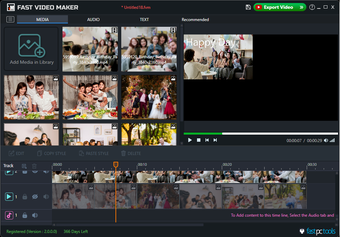
Fast Video Maker allows you to combine photos, video clips, background music, text, and visual elements into a single project. You can arrange media on a timeline, preview changes instantly, and export your finished video in just a few steps.
Whether you're creating a slideshow, promotional video, product presentation, travel vlog, birthday video, educational content, or social media post, Fast Video Maker provides an efficient editing experience.
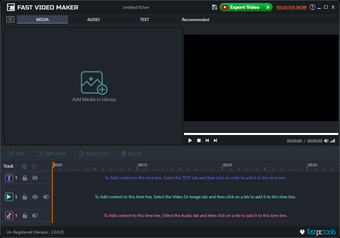
Multi-Track Timeline Editing
The software supports multiple editing tracks, making it easier to organize different types of content within the same project.
Create separate tracks for:
Video clips
Images
Audio files
Titles and text
This flexible timeline helps you build more dynamic videos while keeping your project organized.
Live Preview While Editing
Every change can be viewed immediately in the built-in preview window. You can reposition objects, resize images, adjust text placement, and review your edits before exporting the final video.
Real-time preview helps reduce editing mistakes and speeds up the overall workflow.
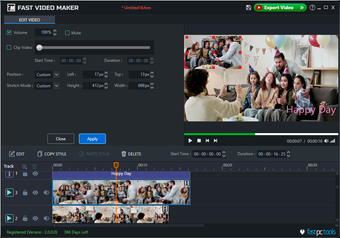
Picture-in-Picture (Video-in-Video)
Display multiple videos on the screen simultaneously using Picture-in-Picture mode. This feature is useful for tutorial videos, presentations, product demonstrations, interviews, reaction videos, gameplay recordings, and educational content.
You can resize and position each video directly inside the preview window.
Add Text, Titles and Captions
Create professional-looking title screens and captions by adding text anywhere in your video.
Adjust the position, size, font, and alignment to match the style of your project. Titles can be used for introductions, subtitles, chapter headings, credits, or important on-screen information.
Support for Photos, Videos and Audio
Import commonly used media formats and combine them into a single project.
Use:
Photos
Video clips
Background music
Voice recordings
Mix different media types to create engaging videos for work, education, marketing, or personal use.
High-Quality Video Export
Export your finished project in multiple resolutions suitable for different platforms and devices.
Supported output resolutions include:
HD (720p)
Full HD (1080p)
2K
4K
8K (supported where hardware and selected settings allow)
Choose the output quality and settings that best match your project requirements.
Easy for Beginners
Fast Video Maker is built for users who want professional results without the steep learning curve often associated with advanced editing software.
Its simple layout, drag-and-drop editing, and clear project organization make it suitable for beginners while still providing useful tools for experienced creators.
Suitable For
Fast Video Maker can be used to create:
YouTube videos
Instagram Reels
Facebook videos
Business presentations
Marketing videos
Product demonstrations
Tutorial videos
Educational lessons
Family videos
Travel memories
Birthday slideshows
Corporate training content
Key Features
Easy-to-use video editing interface
Multi-track timeline editing
Live preview while editing
Picture-in-Picture (Video-in-Video)
Add photos, videos, music, and text
Flexible object positioning and resizing
High-quality HD, Full HD, 2K, 4K and 8K export
Suitable for beginners and professionals
Fast rendering and efficient workflow
Free to download and try
Loading…
App specs
License
Trial version
Version
2.0.0
Latest update
Platform
Windows
Other platforms (2)OS
Windows 8.1
Language
English
Downloads
7
Last month's downloads
- 7
Size
2.61 MB
Developer
- FastPCTools
- More programs (5)
Also available in other platforms
Fast Video Maker for PC
- Trial version
- 4.21
- 7
- V2.0.0
Download for PC
View an ad to download for free
User reviews about Fast Video Maker
Have you tried Fast Video Maker? Be the first to leave your opinion!
Add reviewTop downloads Video for Windows
Top downloads Video for Windows
Top downloads Video for Windows

VidMate
Get high-quality video downloads from many sources

VLC media player
The all-in-one solution for media playback

CapCut
Free all-in-one video editor for everyone

DaVinci Resolve
Free powerful video and audio editing software

Adobe Premiere Pro
Download Adobe Premiere Pro for Windows – Professional Video Editing at Your Fingertips
Related topics about Fast Video Maker
Latest articles

AI image generators now create more convincing fakes: the old giveaways no longer work

The Matrix Reloaded returns to free streaming: Pluto TV comeback puts it back in the top 10

Arm, Intel and AMD update upcoming CPUs: a big boost for on-device assistants

Marvel Rivals adds Scarlet Witch’s Age of Ultron skin: it arrives July 31
Pixel 12 rumors surface: Tensor G7 hints at a big upgrade
Laws concerning the use of this software vary from country to country. We do not encourage or condone the use of this program if it is in violation of these laws. Softonic may receive a referral fee if you click or buy any of the products featured here.